GPS Clock In & Out for Security Guards
Location-verified timesheets that eliminate buddy punching and give you real-time visibility of every guard on every site.
How GPS Clock In Works
Three simple steps from arrival to verified timesheet.
1. Guard Opens TacDesk
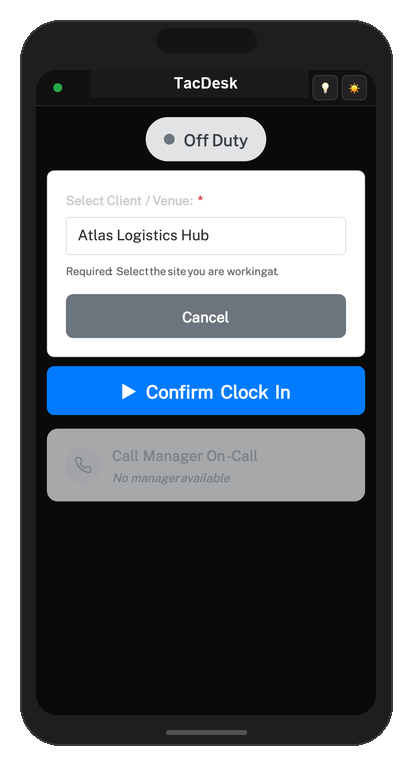
On arrival at site, the guard opens TacDesk on their phone. The app detects their GPS location automatically — no manual entry needed.
2. Select Site & Clock In
The guard selects their assigned client site and taps Clock In. TacDesk captures GPS coordinates, timestamp, and links it to their shift.
3. Verified & Logged
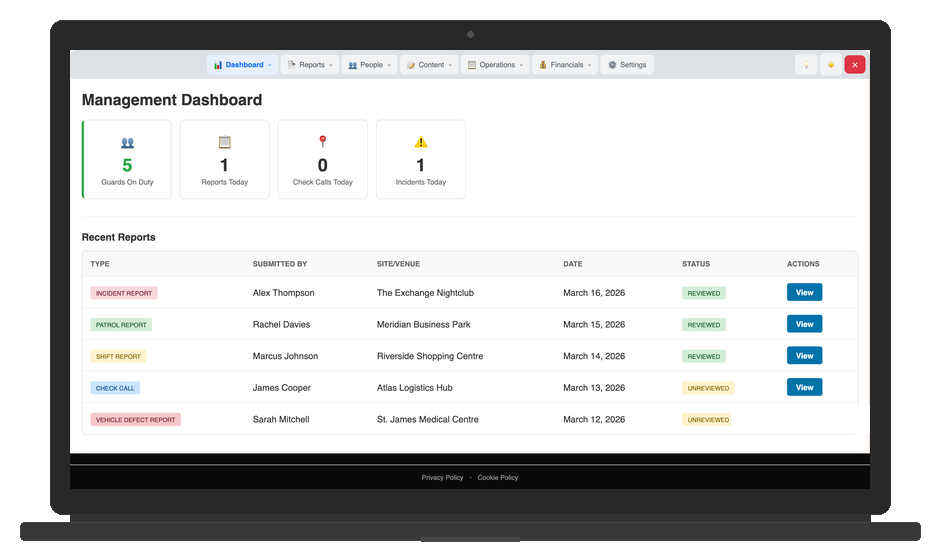
Management sees the clock-in instantly on the live dashboard. Coordinates are stored for audit trails and timesheet verification.
Why GPS Clock In Matters
The tools that set TacDesk apart from basic time-tracking apps.
Eliminate Buddy Punching
GPS verification means guards must physically be on site to clock in. No more friends clocking in for absent colleagues.
Real-Time Visibility
See which guards are on site right now, who's late, and who hasn't arrived — all from your management dashboard.
Automated Timesheets
Clock data flows directly into timesheets and hours-by-client reporting. No manual data entry, no spreadsheets, no disputes.
Complete Audit Trail
Every clock event is logged with GPS coordinates, timestamps, and guard ID. Export anytime for compliance or client reporting.
Late & No-Show Alerts
Get notified immediately when a guard hasn't clocked in by their scheduled start time. React before clients notice.
Works on Any Device
TacDesk runs as a Progressive Web App — works on any modern smartphone with a browser. No app store download required.
Frequently Asked Questions
Stop Guessing Who's On Site
Try GPS clock-in with a free 30-day trial. No credit card required.